
You check your phone and notice something feels wrong. Your X (formerly Twitter) account is suddenly posting crypto scams. Your profile picture has changed to a random NFT, and suspicious links are being sent through your DMs.
Within seconds, panic sets in. The biggest question hits immediately: How long will it take to recover your account?
Recovery is rarely instant. Depending on the situation, it can take anywhere from 24 hours to several weeks. However, the actual timeline depends on factors many users only discover after they lose access.
Let’s break down what really affects recovery time — and how you can improve your chances of getting your account back faster.
Why X Account Recovery Time Varies
Not every hacked account is treated the same. X prioritizes recovery cases based on risk level, account credibility, and available verification data.
Verification Status Matters Most
Users with X Premium or verified accounts usually receive faster responses. These accounts often get priority because they typically have higher visibility and stronger identity verification history.
Regular accounts without verification may wait longer because they compete with a larger volume of support requests.
Type of Hack Influences Urgency
Accounts actively spreading phishing links, scams, or malware often trigger automated safety systems. Ironically, this can speed up manual review because the platform flags them as high risk.
On the other hand, hacked accounts that remain quiet may take longer to get noticed.
Support Ticket Volume Changes Frequently
Recovery speed often depends on how many security cases X is handling at the time. Platform-wide breaches or viral scam campaigns can significantly increase response delays.
The Realistic Recovery Timeline
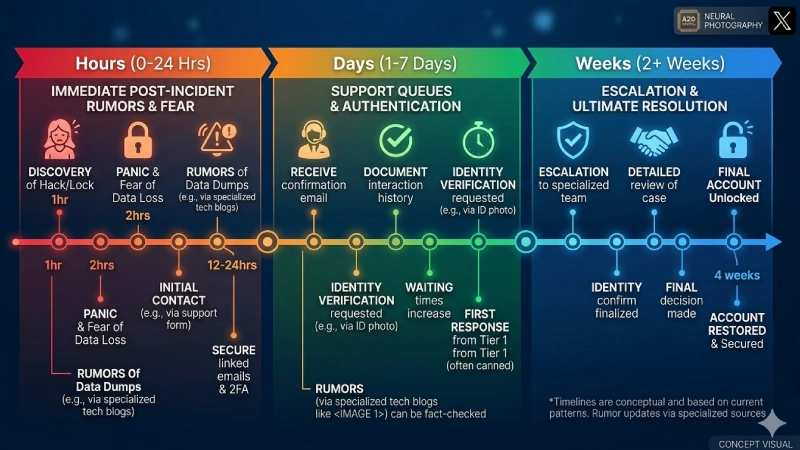
Hours 0–2: Immediate Lockout
Most users discover the hack when they attempt to log in and find their password has changed. In some cases, hackers also enable their own two-factor authentication, blocking access even if you still know your password.
During this phase, users often panic and submit multiple support tickets or search for unofficial recovery services. These actions can actually slow recovery.
Hours 2–24: Automated Support Responses
After submitting a request through the official help center, you will usually receive an automated confirmation email. This simply confirms that your ticket was received.
It does not mean your case is being actively reviewed yet. At this stage, your request is placed in a queue.
Days 1–3: Initial Human Review
Verified users may receive responses from human support teams during this period. Typically, X requests identity verification, such as:
- Government-issued ID
- Selfie verification
- Account ownership details
Meanwhile, regular users may experience complete silence, which is unfortunately common.
Days 3–7: Verification Processing
Once you submit verification documents, the review process begins. This stage is mostly manual, which explains the delay.
Support teams verify identity details, check document authenticity, and confirm ownership matches account data. If documents are unclear or mismatched, the process resets, adding several extra days.
Days 7–14: Account Restoration
If verification is successful, X typically restores access within this timeframe. You will receive password reset instructions and security recommendations.
If recovery exceeds two weeks, the case may require escalation or additional review.
What Usually Slows Down Recovery
Recovery delays often happen for predictable reasons rather than random support backlog.
Poor Verification Documents
Blurry photos, cropped IDs, or documents with glare are the most common causes of rejection. X requires a clear, full image of your official ID with readable text.
Each rejected submission can add several days to the timeline.
Limited Account History
Older accounts with consistent activity often pass verification faster. New accounts with minimal posting history may face additional fraud checks.
Multiple Support Requests
Submitting tickets through multiple channels can create duplicate cases. This confusion may delay review instead of speeding it up.
If you want to understand how support systems prioritize requests, you may find our guide on how social platforms handle account security workflows helpful. (Internal linking placeholder)
Missing Recovery Information
Accounts without backup email addresses or phone numbers are harder to verify. Setting up recovery options beforehand significantly improves security.
How to Speed Up X Account Recovery
Although you cannot control support queue times, you can avoid mistakes that cause unnecessary delays.
Submit Clear Verification Documents
Take new photos using proper lighting. Ensure all ID corners are visible and details match your account name exactly.
Use Official Support Channels Only
Always submit requests through X’s official help center. Avoid third-party recovery services or unofficial support emails.
If you are unsure how to verify legitimate platform security processes, you can also read our article on recognizing fake tech support scams. (Internal linking placeholder)
Keep Detailed Records
Screenshot suspicious activity and track all communication with support. Documentation can help if escalation becomes necessary.
Avoid Changing Linked Emails During Recovery
Switching recovery email addresses mid-process may trigger fraud warnings and delay verification.
When Recovery Takes Longer Than Expected
If recovery takes more than three weeks, the case may require escalation or manual investigation.
Premium users can sometimes escalate through business support channels. Standard users may try raising visibility through official support tags, although responses are not guaranteed.
Be extremely cautious with third-party recovery offers. Many scammers target hacked account victims. Never share passwords or pay upfront fees.
Unfortunately, in rare situations, accounts permanently suspended for policy violations may not be recoverable.
How to Prevent Future X Account Hacks
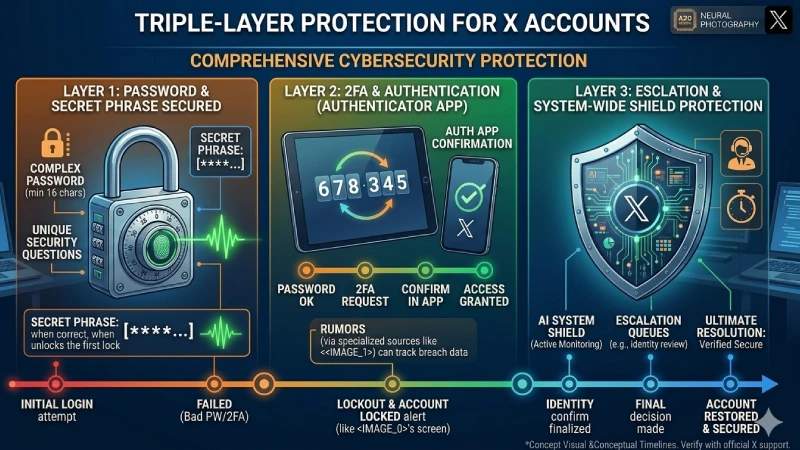
Once you regain access, strengthening your account security should be your top priority.
Enable Two-Factor Authentication
Authenticator apps are significantly safer than SMS verification.
Use Unique Passwords
Many hacks happen because attackers reuse leaked credentials from other platforms. A password manager can help you create and store secure passwords safely.
Review Connected Apps and Sessions
Remove suspicious third-party app permissions and log out unknown devices. Keeping your login history clean improves account safety.
Bottom Line
Recovering a hacked X account typically takes one day to several weeks, depending on support queue volume, verification status, and document accuracy.
While you cannot control X’s response speed, you can improve your chances by submitting accurate verification details, following official recovery procedures, and avoiding duplicate requests.
The recovery process can be stressful. However, most users regain access when they follow the correct steps and remain patient. Once access is restored, strengthening your security setup helps prevent the same situation from happening again.
FAQ
A1:In most cases, no. X usually requires government-issued identification to confirm ownership and prevent fraudulent recovery attempts.
A2:Yes, if email notifications are enabled. However, hackers often disable alerts quickly, so checking older notification emails may help.
A3:You must manually remove unauthorized posts after regaining access. X does not automatically delete them.
A4:No. All recovery requests must go through the official help center. Phone numbers claiming to be X support are typically scams.
A5:If your account has followers, verification status, or brand value, recovery is usually worthwhile. Otherwise, creating a new account may be simpler.
A6:It significantly reduces risk but does not eliminate it entirely. Strong passwords and careful login monitoring are also essential.