In today’s fast-paced digital world, cloud storage services have become an essential part of everyday life. Whether you’re storing personal files, managing business documents, or collaborating with remote teams, choosing the best cloud storage service in 2026 can significantly improve your productivity, security, and workflow.
With so many options available, selecting the right platform can be overwhelming. Some services prioritize collaboration, while others focus on privacy, backup, or affordability. That’s why this complete cloud storage comparison guide will help you understand the strengths and weaknesses of each provider.
In this detailed guide, we’ll explore the best cloud storage services in 2026, compare features, pricing, pros and cons, and help you choose the perfect solution based on your needs.
What is Cloud Storage?
Cloud storage is a technology that allows users to store data on remote servers instead of local storage devices like hard drives or USB drives. These servers are managed by cloud service providers and can be accessed anytime through the internet.
Instead of relying on physical storage, cloud storage offers:
- Remote access from any device
- Automatic syncing between devices
- Secure file sharing
- Backup and recovery options
Modern cloud storage services combine multiple features into one platform:
- File storage and organization
- Data backup and recovery
- Collaboration tools
- Advanced security systems
Unlike traditional storage methods, cloud storage provides scalability, meaning you can increase or decrease storage based on your needs without buying new hardware.
Why Cloud Storage is Important in 2026
Cloud storage has become more important than ever. Here are the main reasons:
1. Remote Work and Digital Collaboration
With the rise of remote jobs and online businesses, cloud storage allows teams to work together in real time from different locations.
2. Data Security and Backup
Cloud storage protects your files from device failure, theft, or accidental deletion by storing them securely online.
3. Easy Accessibility
You can access your files anytime, anywhere using your phone, laptop, or tablet.
4. Cost Efficiency
Instead of buying expensive hardware, you can pay for storage as needed.
5. Automatic Updates and Syncing
Files are updated automatically across all devices, ensuring you always have the latest version.
Top Cloud Storage Services Compared (2026)
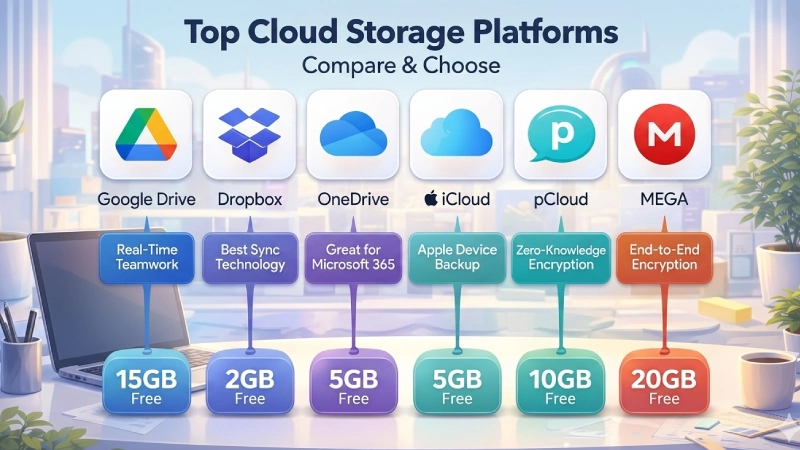
Here are the most popular and reliable cloud storage providers:
- Google Drive – Best for collaboration
- Dropbox – Best for file syncing
- Microsoft OneDrive – Best for Windows users
- Apple iCloud – Best for Apple users
- pCloud – Best for privacy
- IDrive – Best for backup
- MEGA – Best for security
Quick Comparison Table
| Feature | Google Drive | Dropbox | OneDrive | iCloud | pCloud | IDrive | MEGA |
|---|---|---|---|---|---|---|---|
| Free Storage | 15GB | 2GB | 5GB | 5GB | 10GB | 10GB | 20GB |
| Max Storage | 30TB | 3TB+ | 6TB | 2TB | 10TB | 50TB | 20TB |
| Best For | Collaboration | Syncing | Windows | Apple | Privacy | Backup | Security |
| Encryption | Standard | Standard | AES 256-bit | Standard | Zero-knowledge | End-to-end | End-to-end |
1. Google Drive – Best for Collaboration
Google Drive is one of the most widely used cloud storage platforms worldwide. It is especially popular among students, freelancers, and businesses.
Key Features
- 15GB free storage
- Integration with Google Docs, Sheets, and Slides
- Real-time collaboration
- Smart search using AI
- Easy sharing and permissions
Pros
✔ Generous free storage
✔ Excellent collaboration tools
✔ Works on all devices
Cons
✘ No end-to-end encryption
✘ Storage shared with Gmail
Google Drive is ideal for users who need strong collaboration features and easy file sharing.
2. Dropbox – Best for File Syncing
Dropbox is known for its reliable and fast syncing capabilities.
Key Features
- Smart Sync technology
- File version history
- Third-party integrations
- Clean interface
Pros
✔ Fast syncing
✔ Easy to use
✔ Reliable performance
Cons
✘ Only 2GB free storage
✘ Expensive plans
Dropbox is perfect for professionals working with large files like videos or design projects.
3. Microsoft OneDrive – Best for Windows Users
OneDrive is deeply integrated into the Microsoft ecosystem.
Key Features
- 1TB storage with Microsoft 365
- Personal Vault for extra security
- Integration with Windows
- File sharing and collaboration
Pros
✔ Great value with Office apps
✔ Strong Windows integration
✔ Secure storage
Cons
✘ Limited free storage
OneDrive is best for users already using Microsoft Office tools.
4. Apple iCloud – Best for Apple Ecosystem
iCloud is designed specifically for Apple users.
Key Features
- Automatic backups
- Photo syncing
- Family sharing
- Seamless Apple integration
Pros
✔ Very easy to use
✔ Works perfectly with Apple devices
Cons
✘ Limited compatibility outside Apple
5. pCloud – Best for Privacy
pCloud is known for strong privacy features and lifetime plans.
Key Features
- Zero-knowledge encryption
- Lifetime pricing
- Media streaming
- Remote upload
Pros
✔ Strong privacy
✔ One-time payment
Cons
✘ Encryption costs extra
6. IDrive – Best for Backup
IDrive is ideal for backup and storage.
Key Features
- Full device backup
- External drive support
- Real-time backup
Pros
✔ Affordable
✔ Large storage options
Cons
✘ Complex interface
7. MEGA – Best for Security
MEGA focuses on security and encryption.
Key Features
- End-to-end encryption
- 20GB free storage
- Secure sharing
Pros
✔ Strong security
✔ Good free plan
Cons
✘ Slower speed
Google Drive vs Dropbox vs OneDrive
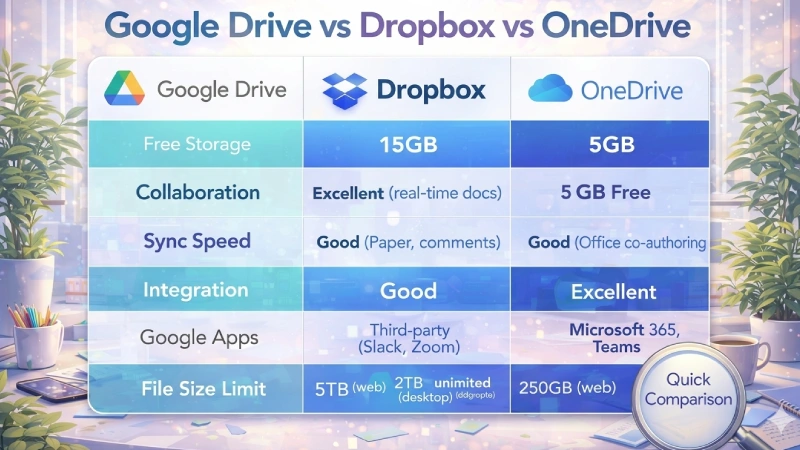
| Feature | Google Drive | Dropbox | OneDrive |
|---|---|---|---|
| Free Storage | 15GB | 2GB | 5GB |
| Sync Speed | Good | Excellent | Good |
| Collaboration | Excellent | Good | Good |
How to Choose the Best Cloud Storage
1. Storage Needs
Choose based on your usage level.
2. Security
If privacy is important, choose encrypted services.
3. Budget
Compare free and paid plans.
4. Compatibility
Ensure it works on your devices.
Best Cloud Storage for Different Users
Students
Google Drive
Freelancers
Dropbox or Google Drive
Businesses
OneDrive
Privacy Users
MEGA or pCloud
Advantages of Cloud Storage
✔ Access anywhere
✔ Easy collaboration
✔ Automatic backup
✔ Scalable
Disadvantages
✘ Internet dependency
✘ Subscription costs
✘ Privacy concerns
Future Trends in Cloud Storage
Cloud storage is evolving rapidly:
- AI-powered organization
- Stronger encryption
- Hybrid storage
- Faster performance
Final Verdict: Best Cloud Storage Services
| Use Case | Best Choice |
|---|---|
| Best Overall | Google Drive |
| Best Syncing | Dropbox |
| Best Windows | OneDrive |
| Best Apple | iCloud |
| Best Privacy | pCloud |
| Best Backup | IDrive |
| Best Security | MEGA |
Conclusion
Cloud storage is an essential tool in 2026. Choosing the right service can improve your productivity, protect your data, and simplify your digital life.
Start with a free plan, test features, and upgrade when needed. The right cloud storage solution will save you time, money, and effort in the long run.
FAQ
A1: The best cloud storage service in 2026 depends on your needs. Google Drive is best for collaboration, Dropbox for syncing, OneDrive for Windows users, and MEGA for security.
A2: MEGA offers one of the largest free plans with 20GB storage, while Google Drive provides 15GB free storage with strong collaboration features.
A3: Yes, most cloud storage services use encryption and security features to protect your data. For maximum privacy, choose services with end-to-end encryption like MEGA or pCloud.
A4: Microsoft OneDrive and Google Drive are the best options for businesses due to their collaboration tools, integration with office apps, and scalable storage plans.
A5: Yes, many users combine services (like Google Drive + Dropbox) to take advantage of different features such as collaboration, backup, and extra storage.