You have a great idea for a website.
You’ve picked a domain name.
You can already imagine the pages, the colors, and the message you want to share.
However, when you start researching how to put that site online, everything suddenly feels complicated.
You encounter unfamiliar terms like shared hosting, VPS, bandwidth, and servers.
Right then, it can feel like you need technical expertise just to launch a simple website.
It’s easier than it looks.
At its core, web hosting is just renting a reliable home for your website on the internet. Once you understand that, everything else starts to make sense.
Why Every Website Needs Hosting
A website is more than an idea.
It is a collection of files:
- Text and blog posts
- Images and videos
- Design files and code
For people around the world to access those files, they need to live on a computer that is:
- Always powered on
- Always connected to the internet
- Fast enough to handle multiple visitors
Your personal computer isn’t built for that job.
It shuts down, lacks a permanent internet connection, and can’t reliably serve hundreds of visitors.
Without hosting, your website is just a folder on your desktop.
What Is Web Hosting (In Simple Terms)?
Web hosting is a service that stores your website files on powerful machines called servers.
These servers are maintained by hosting companies and run 24/7.
Here’s how it works:
- Someone types your domain name into a browser
- The browser finds your hosting server
- The server delivers your website files
- The visitor sees your website
That’s all there is to it.
A Simple Analogy
- Domain name: Your street address
- Web hosting: The land and building
- Server: The infrastructure that keeps everything running
An address without a building points to nothing.
A website without hosting has nowhere to live.
Types of Web Hosting (Explained Simply)
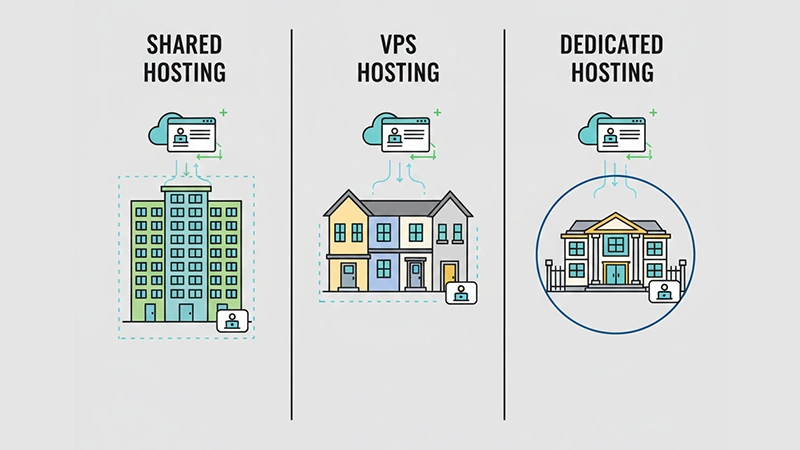
Not all hosting is the same. Different needs require different plans.
🏠 Shared Hosting – The Starter Apartment
This is the most common choice for beginners.
How it works:
Your website shares server resources with many others, like living in an apartment building.
Best for:
- Personal blogs
- Small business websites
- Beginner projects
Why it’s great:
- Cheapest option
- Easy to set up
- Hosting company manages most things
Trade-off:
If another site on the server gets very busy, your performance can slow down temporarily.
👉 For most beginners, shared hosting is a perfect first step.
🏡 VPS Hosting – The Townhouse Upgrade
VPS stands for Virtual Private Server.
It still uses one physical server, but your site gets its own reserved space—like a townhouse.
Best for:
- Growing websites
- Online stores
- Moderate to high traffic
Benefits:
- Consistent performance
- More control
- Less impact from neighbors
Drawback:
More expensive and a bit more technical to manage.
🏢 Dedicated Hosting – Your Own Warehouse
This gives you an entire server to yourself—no sharing.
Best for:
- Large companies
- High-traffic platforms
- Custom applications
Benefits:
Maximum performance and control
Drawback:
Most expensive and requires technical skill
Not recommended for beginners unless your site already has heavy traffic and specific needs.
Why Hosting Quality Matters (More Than You Think)
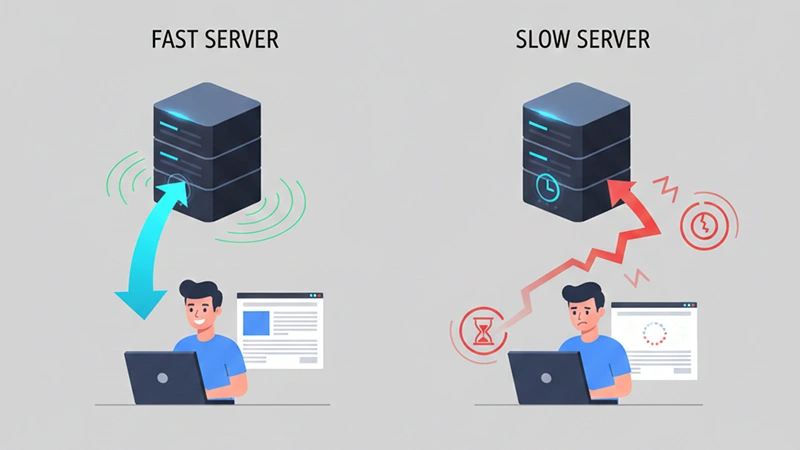
Many beginners assume hosting only determines whether a site is online.
In reality, good hosting affects:
- Website speed
- Stability during traffic spikes
- Security and uptime
- Ability to grow without service interruption
If you’re curious about how hosting affects performance, check out our related guide:
👉 Why Websites Feel Slow — And How Hosting Affects Speed
Even a well-designed site can feel sluggish on weak hosting — and visitors don’t wait around for slow pages.
What to Look for in Beginner-Friendly Hosting
When you’re just starting, the right host should remove hurdles, not add them.
Here’s what to prioritize:
- One-Click Software Installers – Makes WordPress setup effortless
- Clear Support Options – 24/7 live chat or phone support is incredibly helpful
- Uptime Guarantee (99.9%+) – Ensures your site stays online
- Free SSL Certificate – Secure connection (padlock icon in browsers)
- Transparent Pricing – No hidden renewal fees
- User-Friendly Dashboard – Easy to navigate even for non-technical users
Trusted Hosting Platforms for Beginners
Below are several beginner-friendly hosting providers worth considering. Each has its own strengths, so you can choose based on what matters most to you—ease, performance, or support.
⭐ Hostinger — Best Value for Beginners
Hostinger is popular with new site owners because it combines affordability with ease of use.
Why it’s a good choice:
- Very beginner-friendly custom panel (hPanel)
- Great performance for budget plans
- Free domain + SSL (in many plans)
- Fast, responsive support
💡 With our referral link you get 20% off your plan:
👉 Claim Here
Best for:
- Personal blogs
- Small business sites
- First-time WordPress users
⭐ Bluehost — Official WordPress Partner
Bluehost is widely recommended for people building their first WordPress site.
Why it’s great:
- Official WordPress.org recommendation
- Simplified WordPress setup
- Helpful onboarding for beginners
- 24/7 support
Best for:
- WordPress users who want a guided start
⭐ SiteGround — Speed + Support
SiteGround is known for excellent support and reliability.
Highlights:
- Excellent customer service
- Strong performance and uptime
- Security features built in by default
Best for:
- Beginners who want top-tier support
- Sites with performance priorities
⭐ A2 Hosting — Speed-Focused Shared Hosting
A2 Hosting emphasizes performance and speed, even on shared plans.
Why it’s worth considering:
- Turbo plans available for faster load times
- Easy setup for beginners
- Good balance of cost and performance
Best for:
- Sites that want faster shared hosting
⭐ DreamHost — Simplicity + Transparency
DreamHost is another beginner-friendly host, known for clear pricing and simple setup.
Standout points:
- 97-day money-back guarantee (one of the longest)
- Easy WordPress setup
- Clean dashboard
Best for:
- Budget beginners who want flexible terms
Quick Comparison Table
| Provider | Best For | Standout Feature |
|---|---|---|
| Hostinger | Budget beginners | Intuitive control panel + low cost |
| Bluehost | WordPress newbies | Official WordPress recommendation |
| SiteGround | Support & performance | Excellent live support |
| A2 Hosting | Faster shared hosting | Turbo speed options |
| DreamHost | Easy terms | Long money-back policy |
Your Simple Launch Checklist
- Pick a domain name
This is your unique web address (e.g., yourbrand.com). - Choose a hosting plan
Start with shared hosting from a trusted provider. - Connect your domain to your host
Your host gives simple instructions to link your domain. - Install a site builder
Use one-click installers like WordPress. - Build and publish your content
Your site is now live on the internet!
The Bottom Line
Web hosting isn’t a mysterious ritual. It’s simply renting a secure, reliable home for your website on the internet.
You don’t need to understand server hardware to get started. You only need a quality host that helps you focus on what matters—creating and sharing your content.
Starting with a beginner-friendly provider like Hostinger, Bluehost, SiteGround, A2 Hosting, or DreamHost takes the biggest technical barrier off your plate and lets you launch with confidence.
Ready to put your website online?
The jump from idea to a live site is smaller than it feels. With the right hosting, you’ll be up and running in no time.
FAQ
A1: Web hosting is a service that stores your website files on an always-online server so people can access your site through the internet at any time.
A2: Yes. A website cannot be accessed online without hosting. Even if you build a site locally, hosting is required to make it visible to others.
A3: Shared hosting is best for beginners because it’s affordable, easy to manage, and requires no technical knowledge to get started.
A4: Yes. Hosting quality directly impacts how fast a website loads, how it handles traffic, and how reliable it feels to visitors.
A5: Free hosting can work for testing or learning, but it often comes with slow speeds, ads, and security limitations. For real projects, paid hosting is more reliable.
A6: Yes. Most websites can move to a different hosting provider as they grow. Many hosts even offer free migration services.
A7: No. A domain name is your website’s address, while hosting is the space where your website files live. You need both for a website to work.